

I was splitting a $5,000 payment to my landlord across two days because Zelle only lets me send $3,500 a day. My husband looked up from the kitchen table and said, “We’ve been doing this for a week. Do we actually understand our own banking?” Honestly, no. We’d been using the wrong tools for the job.
Turns out there’s an older, slower-to-set-up, but much more capable way to move money between people’s bank accounts: ACH/EFT. And if you have the right kind of account, it beats every P2P app for larger transfers.

Why Venmo and Zelle hit a wall
Here’s how the U.S. ACH system works under the hood, in plain terms: a routing number plus an account number can both deposit money into an account and withdraw money from it. That’s convenient for bill pay, but it makes people nervous about sharing their account number with a stranger — what if you take more than you send?
So person-to-person transfers moved to third-party apps: Venmo, Zelle, PayPal, Cash App. But every one of them has the same catch: both people have to use the same app. You can’t send Zelle to a Venmo user. And every one of them has limits built for small change, not real money.
Bank of America caps Zelle at $3,500 per day, and many banks cap it even lower. Need to send $5,000? You split it across two days and hope the recipient doesn’t ask questions. For buying a couch on Facebook Marketplace or paying the house cleaner, that’s fine. For anything bigger, the apps fall apart.
The banks already solved this — you just have to ask for the right option
Some people don’t mind handing over their routing and account number to someone they trust: a parent sending annual gifts to an adult child, a monthly payment to a mom-and-pop landlord. But when you try to link that account at your bank, most institutions only let you link accounts you own. They verify it with micro-deposits, or nowadays with instant verification through services like Plaid or Mastercard Data Connect (formerly Finicity), which means logging into the other person’s online banking. The bank can see whose name is on the account — and if it doesn’t match yours, the link is rejected.
There’s a workaround built into some banks, and it’s called push-only ACH. When you link someone else’s account, you pick an option that only allows transfers to that account, not withdrawals from it. No money can be pulled out, so the bank doesn’t require ownership verification.
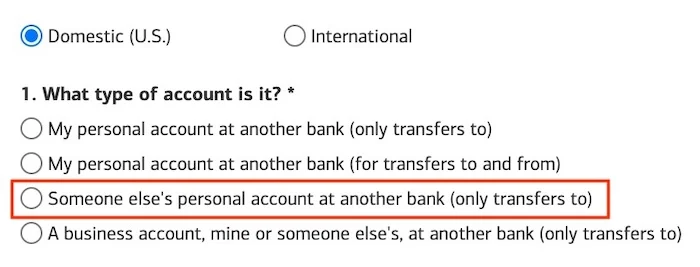
Bank of America is a good example. When you link an external account, it asks whether the account is “only transfers to” or “for transfers to and from.” Choosing the bidirectional option triggers the full Plaid ownership check. Choosing “only transfers to” skips it entirely.
The Fidelity setup: $100,000 a day, free on both ends
I do a lot of my banking through Fidelity, and it handles this the same way. When I link a bank account, Fidelity asks whether it’s mine or someone else’s.
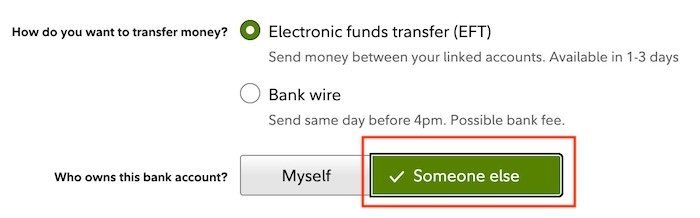
If it’s my account, I get a two-way link — I can push money in and pull it out — and the ownership verification applies. If it’s someone else’s account, I get a push-only link: I can send money to it, but I can’t withdraw from it, and there’s no ownership verification required.
One catch: Fidelity runs the linked account through a banking-industry step called a prenote to confirm it’s valid. That prenote takes at least 3 business days before the first real transfer can go out. Budget about a week of setup time if you’re going to need the transfer soon.
After that, the transfers are genuinely fast. If you request early enough in the morning, the money arrives the same business day. Miss the cutoff and it arrives the next business day. That’s about as fast as a wire transfer — except the receiving side pays nothing. And from a Fidelity account, you can move up to $100,000 per day by EFT/ACH. Try doing that with Venmo.
One limitation to be upfront about: Fidelity’s online interface only handles one-off transfers to someone else’s account. Scheduled or recurring transfers to another person aren’t available online (you can schedule them to your own accounts). If you need recurring payments to someone else, call customer service and ask them to set it up on their end.
The options I’d skip
Before you get excited, here’s what I considered and why it loses:
- Bill pay or a mailed check. Your bank will mail a paper check to an individual, or you can write one yourself. Both sit in the mail for days and can get lost or stolen. Fine in an emergency, not as a system.
- Wire transfers. Many banks charge to send a wire, and many more charge to receive one. Making your landlord pay a $15 fee just to collect money you owe him isn’t great.
- Member-to-member transfers. Some banks and credit unions let you transfer between their own customers — handy if your child at out-of-state college banks with you. But it only works if you’re already at the same institution, which isn’t always possible.
How to use it this week
Here’s the mental model I use now: Venmo and Zelle are for the small stuff — the gardener, the split dinner, the couch on Marketplace. ACH push-only is for the stuff with real numbers in it, and the receiving side needs zero setup. They just hand you their routing number and account number. It’s free on both ends, which is more than I can say for wires.
If your bank supports transfers to another person’s account, you already know where to start. If you’re at Bank of America or Fidelity, look for the “only transfers to” option the next time you link an external account. And if your bank supports this feature, leave a comment with its name so other readers know where to go — I’d genuinely like to know which other banks get this right.